
Sitecore
Administrator checkbox overlaps Azure AD groups
Lately, I have been working a lot in Sitecore environments integrated with Azure AD, and last week, while troubleshooting a permission issue that I couldn’t reproduce with my account.
After struggling for a while, I decided to compare the problematic user with mine and proceed from there.
Azure AD membership
I want to check which groups I belong to that differ from the problematic user, and vice versa. To get a clearer overview, I executed the following PowerShell script, which highlights the differences between two users
Please note the PowerShell script below shows ALL Azure AD groups and not just the ones used for Sitecore Claiming Roles; it is up to you to review the output and adjust using the appropriate groups
$referenceUser = "[email protected]"
$differenceUser = "[email protected]"
Compare-Object -ReferenceObject (Get-AzureADUser -SearchString $referenceUser | Get-AzureADUserMembership -All $true | ? {$_.ObjectType -ne “Role”} | % {Get-AzureADGroup -ObjectId $_.ObjectId | select DisplayName | sort-object -property displayname}) -DifferenceObject (Get-AzureADUser -SearchString $differenceUser | Get-AzureADUserMembership -All $true | ? {$_.ObjectType -ne “Role”} | % {Get-AzureADGroup -ObjectId $_.ObjectId | select DisplayName | sort-object -property displayname}) -property DisplayName -passthru
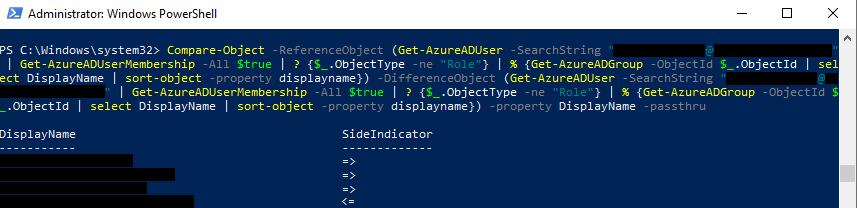
The result of the comparison indicates whether a property value appeared only in the reference object (<=**) or only in the **difference** object (**=>)
With the following output, you will be able to determine whether you should be added or removed to match the reference user.
Then, I made adjustments and now I was part of the same Azure AD groups as the problematic user, but I still couldn’t reproduce the issue…
So, I decided to double-check Sitecore User Manager
Sitecore User Manager
When you first sign in to a Sitecore instance that is integrated with Azure AD, a username is created in User Manager, typically a random set of letters and numbers, as you can see

When I double-clicked my user, I noticed that I had the Administrator checkbox marked
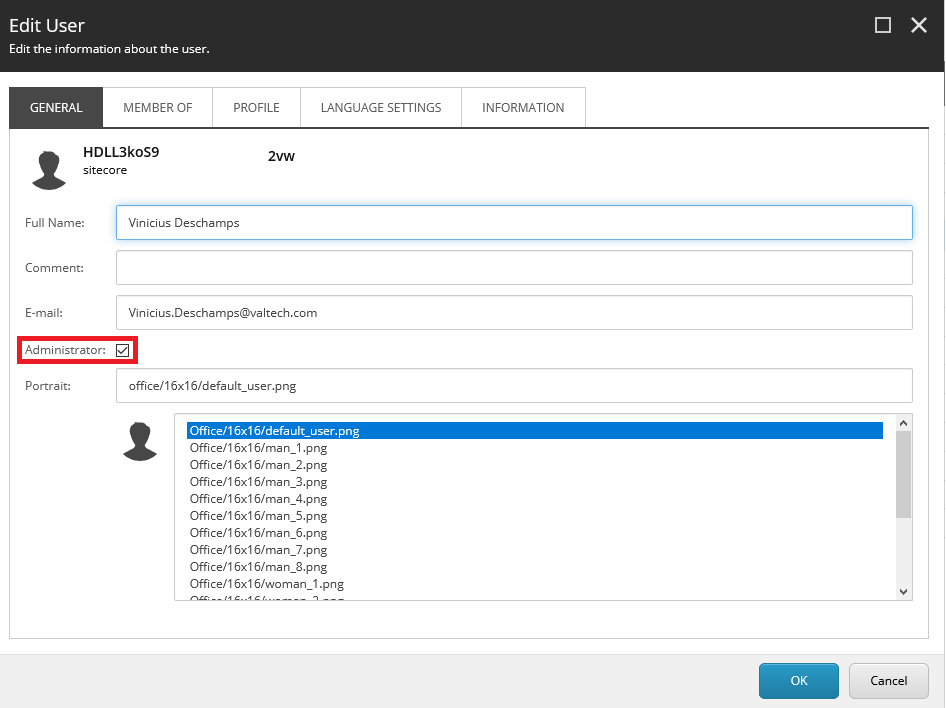
I decided to uncheck the Administrator box, sign out from Sitecore CM, and sign back in.
Voilá! I was able to reproduce the issue and figured out that the Administrator box overlapped with the Azure AD claiming.
I hope you liked it, and I’ll see you in my next post!