
Application Gateway · Azure
Azure Application Gateway
Azure Application Gateway is an application-layer load balancer for web applications, directing traffic based on criteria such as IP address and port, differentiating from traditional load balancers that operate at the transport layer.
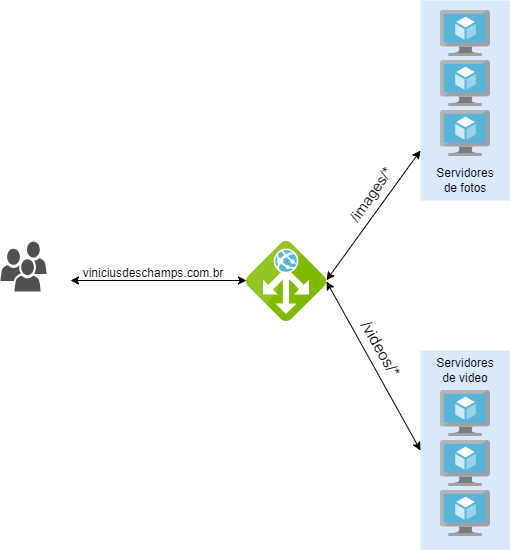
Because it is part of the application layer, the Azure Application Gateway can make routing decisions based on additional attributes of an HTTP request, such as the URI path or the Host headers.
But what does that mean?
It becomes possible to route traffic to a specific set of servers (pool) depending on the input URL, as illustrated in the image below: when accessing https://viniciusdeschamps.com.br/images or /videos, the user will be directed to servers optimized to deliver the selected resource.
In addition, the Azure Application Gateway offers important features (for the full list, see here:
- SSL/TLS protocol termination
- This feature frees web servers from the task of encryption and decryption, and also provides end-to-end SSL/TLS encryption support
- Automatic scaling
- Starting with the Standard v2 SKU, automatic scaling can be used, allowing the Application Gateway to grow or shrink based on changes in traffic patterns
- Web Application Firewall
- Provides centralized protection for your web applications, defending them against vulnerabilities.
- WAF uses rules from the Open Web Application Security Project (OWASP) rule sets
- Multiple site hosting
- Allows you to configure traffic routing based on the hostname or domain
- viniciusdeschamps.com.br, azurefloripa.com.br will point to the IP of the same Azure Application Gateway, but will have different listeners configured, which will direct traffic to the backend pool of the correct site
- Session Affinity
- Through Session Affinity, all traffic and subsequent requests from a client's session will always go to the same server in the backend pool
- Connection draining
- Allows you to remove members from the backend pool during a planned service update
- Ensures that removed instances do not receive new requests/connections, keeping existing connections until the configured timeout value
References: